FIELD NOTES / CREATIVE TOOLMAKING / 2026
APC MINI MK2Building a custom
lighting instrument
I bought a MIDI controller to experiment with light. It became a reason to build my own creative tool.
01 / THE IMPULSE
What if the controller
became the canvas?
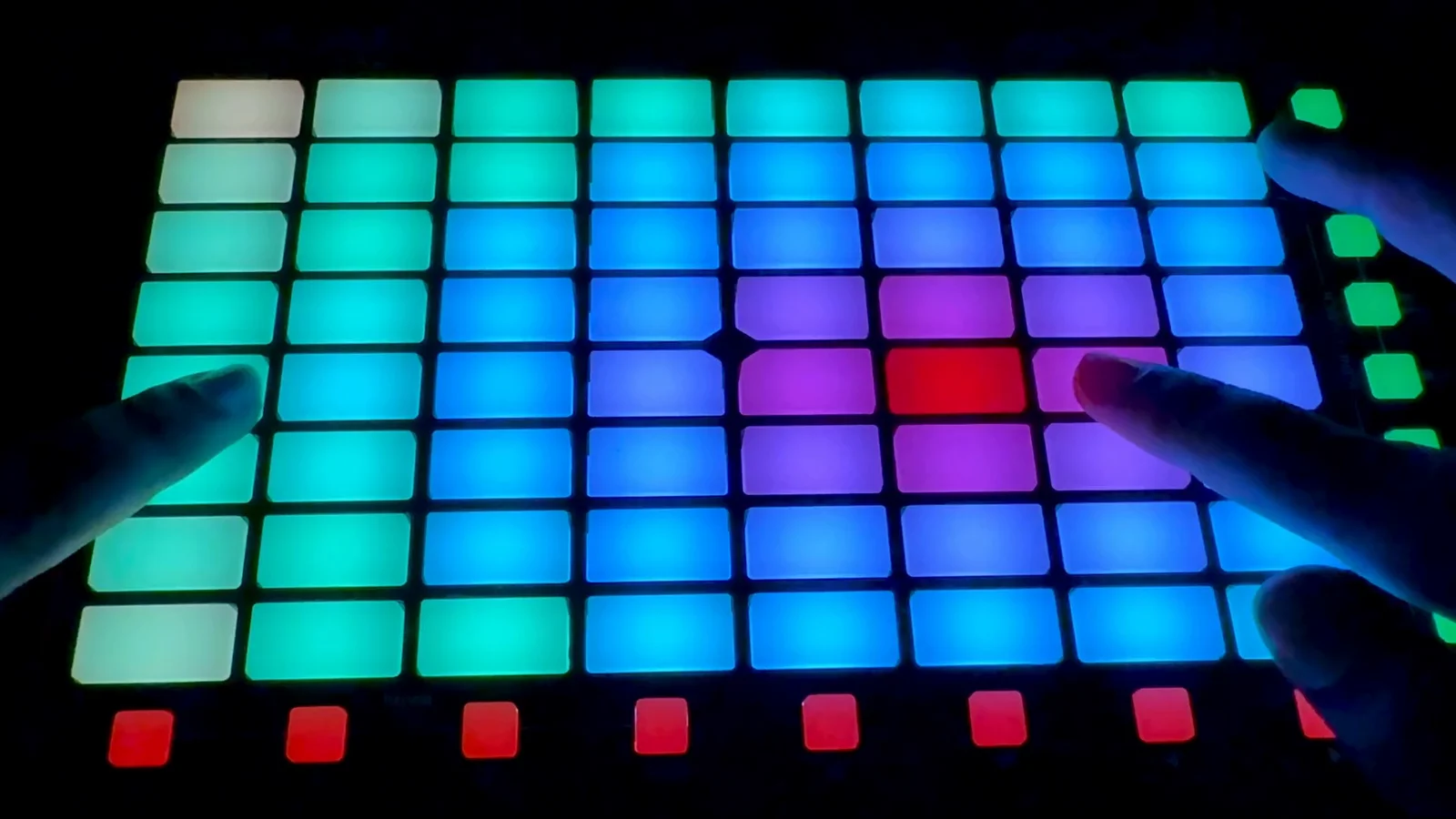
I got an Akai APC Mini MK2 because I wanted to experiment with interactive lighting and visual performance. The grid suggested something immediate: a surface I could paint with light, set in motion and respond to through touch.
While exploring existing tools and integrations, I couldn’t find a workflow with the particular combination of customization, visual control and flexibility I wanted. I wanted to move between precise cell editing and procedural movement, preview an idea without the controller, and bring images into the same system.
That shifted the project from using software to defining an instrument. TouchDesigner became the environment for developing those requirements into something I could see, operate and refine.
THE DESIGN BRIEF I SET MYSELF
- Make each light intentional. Store RGB and brightness independently for all 64 pads.
- Let movement sit over a composition. Preserve manual work while effects run.
- Make experimentation accessible. Edit, preview and test through a virtual controller.
- Leave room for other visual sources. Translate TOP images and video into the same matrix format.
02 / TRY THE IDEA
A small grid.
Room to play.
Paint a few pads. Add a moving background. Trigger a ripple. Then return to your saved colors—the composition is still there.
A simplified browser interpretation of the documented pad and layer behavior. No TouchDesigner or MIDI connection. Animation starts only when you press Play.
What this browser demo represents
Saved RGB and brightness values stay separate from generated light. Seven continuous backgrounds and a pressed-origin ripple illustrate eight movement families. The original also has a white Flash response, TOP media input, hold/repeat settings, Manual/External/Add modes and 16 small LEDs; those controls are not recreated here.
The preview adapts chase and trails to 64 pads (the original uses 80 logical positions), uses a different deterministic sparkle pattern, and simplifies compositing. It is not a color-calibrated hardware simulator. Animation pauses offscreen; reduced-motion preferences are respected by starting paused.
03 / FROM REQUIREMENTS TO RESPONSE
The instrument emerged
through iteration.
These are development milestones, not a dated production schedule. Each stage changed what I could make—and what needed testing next.
- 01
Define the smallest useful unit
The foundation was one editable light, repeated across 64 cells. Keeping stored manual values separate from external input meant switching modes would not erase a composition.
Decision → preserve intent as state - 02
Build a surface I could work with
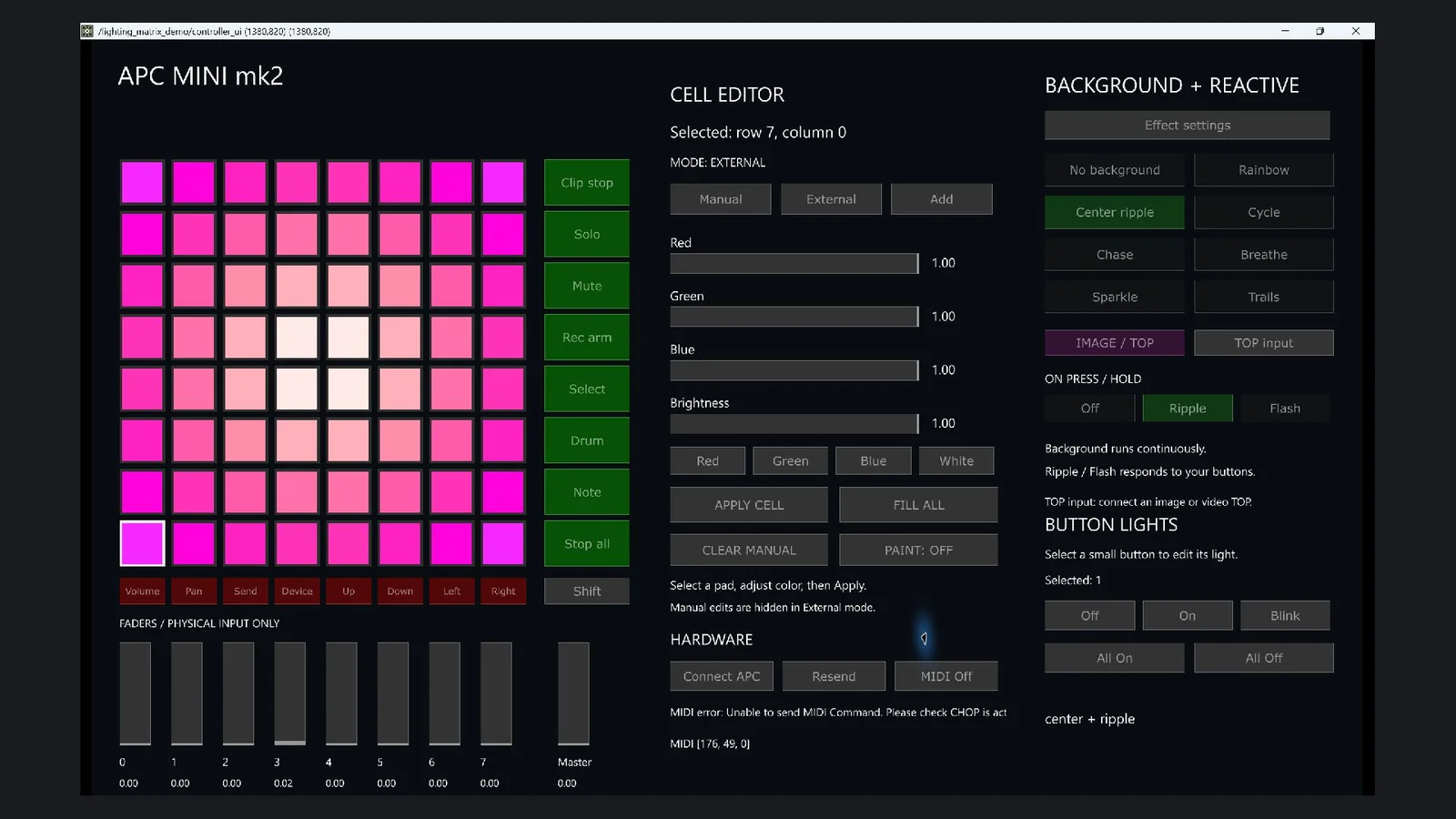
A virtual APC-style interface brought cell selection, color, brightness and output into one place. It let me experiment without attaching the physical device every time.
Decision → preview before hardware - 03
Test the full physical grid
Early output packets updated only four rows on the test controller. Splitting full-board output into four 16-pad packets resolved the issue; recorded development testing confirmed all eight rows and physical pad/fader input.
Decision → let the hardware test the assumption - 04
Separate atmosphere from gesture
Background movement and button-triggered responses became independent layers. Separate speeds and intensities let a slow background coexist with a quicker ripple. Held ripple behavior was also refined so repeats did not keep restarting near red and yellow.
Decision → give each layer its own timing - 05
Bring media into the same language
TOP input added images and video as a continuous background, with reactive light over it. A simplified settings panel made the relationship between background speed, ripple travel, fade and repeat more explicit.
Decision → make the controls explain the system
04 / INSIDE THE INSTRUMENT
One matrix language.
Distinct responsibilities.
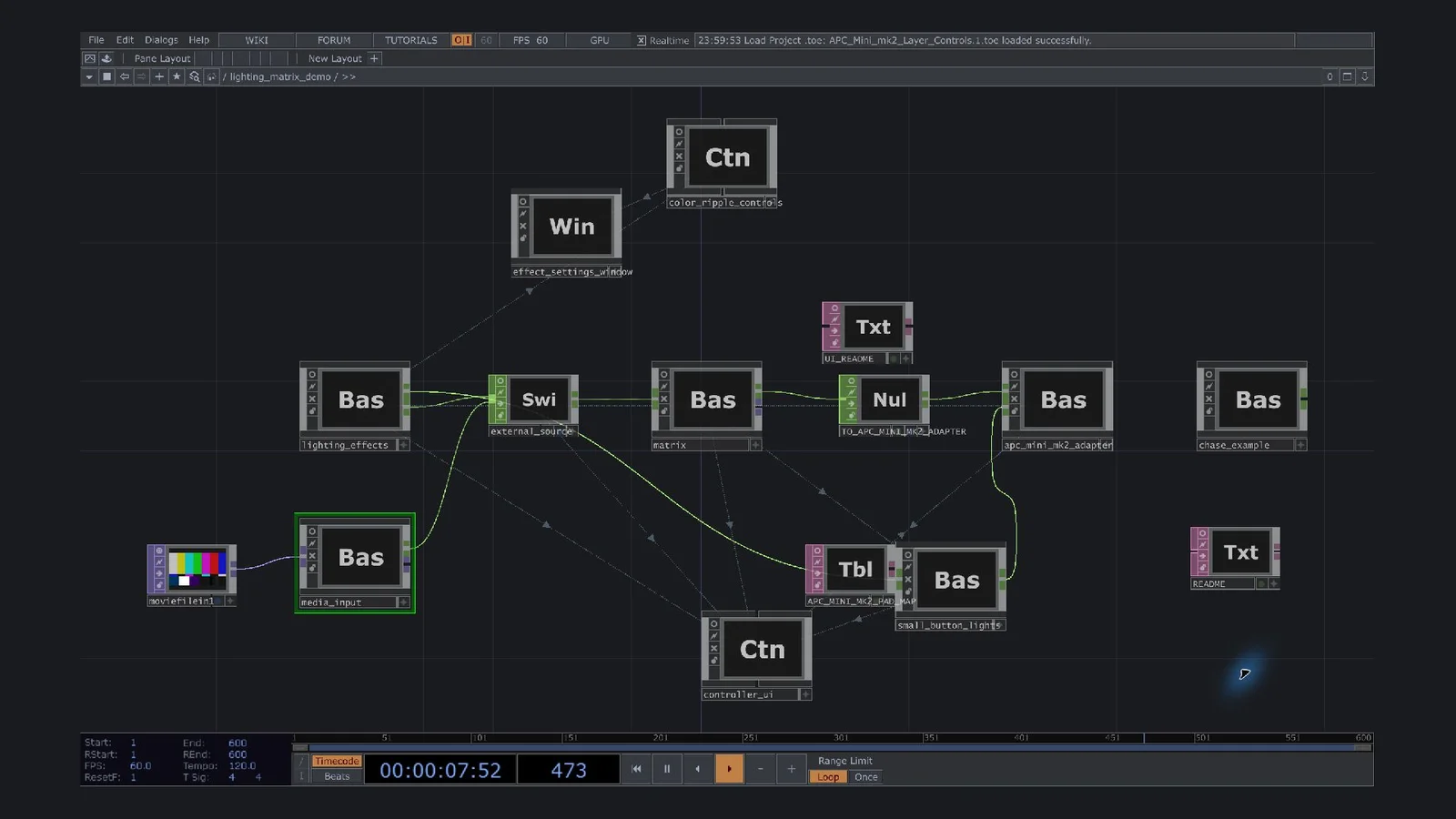
The reusable matrix core is separated from Akai-specific MIDI communication. That is a useful modular boundary; the complete instrument still includes controller-specific layout, event positions and hardware assumptions.
TOP input or a procedural background + press-driven response.
Saved colors can sit beneath generated backgrounds.
Combines stored manual values with the external layer.
r · g · b · brightness / 64 samples / 0–1Matrix contract & composition
matrix/matrix_data contains 64 samples of r, g, b and brightness, indexed by row × 8 + column from the top left. The exact 8 × 8 RGBA TOP multiplies color by brightness.
Manual uses stored cells. External uses the composed input. Add clamps the sum of each channel, including brightness. This is different from the reactive layer’s alpha blend over its background.
Effects, media & timing
Seven continuous procedural backgrounds—Rainbow, Center ripple, Cycle, Chase, Breathe, Sparkle and Trails—sit alongside reactive Ripple and white Flash. This is one background plus one response, not an arbitrary effects stack.
A source TOP is downsampled to 8 × 8 and converted into matrix channels. Image/video playback and cropping belong to the upstream TouchDesigner network; background speed does not retime a video. The saved-color underlay applies to generated backgrounds, not media.
Where modularity stops
The core has a documented CHOP interface and the effect renderers contain no MIDI output code. However, renderers use 80 logical positions for 64 pads and 16 small buttons, and the virtual panel follows the APC layout. Only the Akai adapter is implemented. Another controller would require its own mapping, communication and testing.
chase_example node is disconnected from the final route.05 / OBSERVATION, NOT SIMULATION
From the screen
to the pads.
Real project recordings, kept at their original playback speed. These silent excerpts document particular interactions; they are not a synchronized software-and-hardware capture.
Physical presses with changing light patterns. The off-camera software settings cannot be inferred from this footage.
Open hardware recording ↗Blue pads painted onto red while surrounding cells keep their color.
Open painting recording ↗Rainbow, Center ripple and Cycle selected in the actual virtual interface.
Open effects recording ↗IMAGE / TOP selected with multicolor matrix output and control-mode changes.
Open TOP recording ↗Evidence scope: recorded development checks cover matrix behavior, independent timing and media layering. Physical testing supports MIDI input and visible LED output, but not every later effect, color or small-LED combination. This case study does not claim a fresh TouchDesigner runtime test.
IN CONTEXT
Part of an existing
toolmaking practice.
Programmable LEDs, MIDI mapping and audiovisual performance tools have many precedents. Akai’s APC Mini MK2 / Ableton workflow already uses an illuminated control surface, and TouchDesigner’s lighting tools support established image-to-light and control workflows.
My contribution is the specific interaction experience I wanted to build: precise pad editing, retained color states, independent movement and response, and a virtual surface for experimentation. The gap was in my workflow, not the existence of comparable tools.
06 / WHAT I TAKE FORWARD
Designing the tool became
part of designing the work.
The result is a working lighting prototype with a reusable matrix core, an editable virtual interface and a tested path to the physical APC. The more significant shift was learning to turn a creative preference into a requirement, then into an interaction I could evaluate.
Keeping manual choices intact, separating the timing of two layers and exposing useful controls were design decisions as much as implementation tasks. Codex helped me develop the code; the direction came from what I wanted the instrument to feel like and what testing revealed.